In production · two client portals

AI support that shows its receipts.

CC-RAGOS turns your documentation — PDFs, tables, images, help articles — into cited AI answers, embeddable help centers and a full support desk. Self-hosted, no per-agent fees.

running live · tickets + AI answers handled · satisfaction
Support desk — live analyticsreal production data
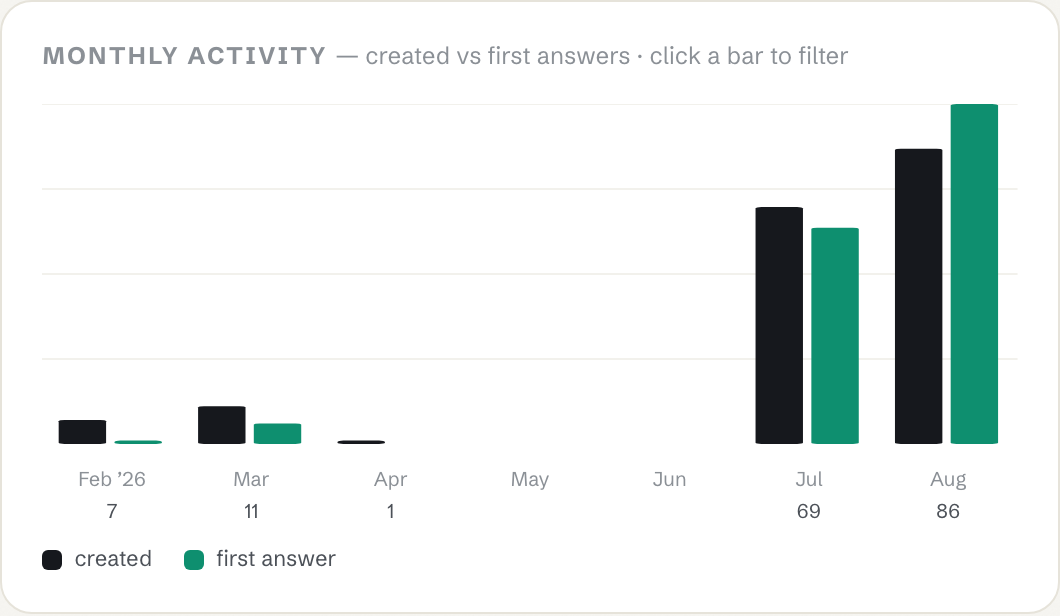
Monthly activity chart from the live support desk — tickets created vs first answers, growing month over month
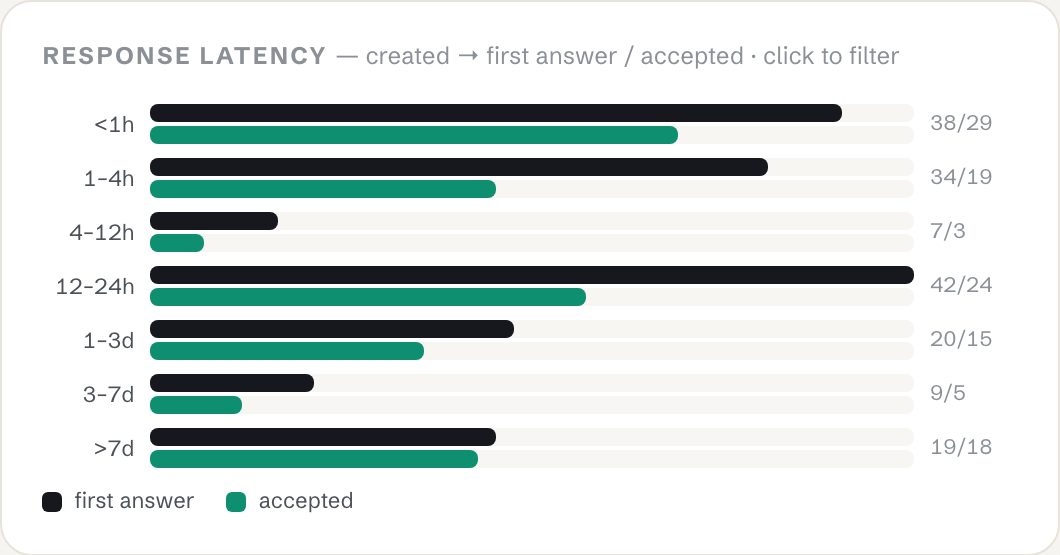
Response latency histogram — created to first answer and accepted, by time bucket
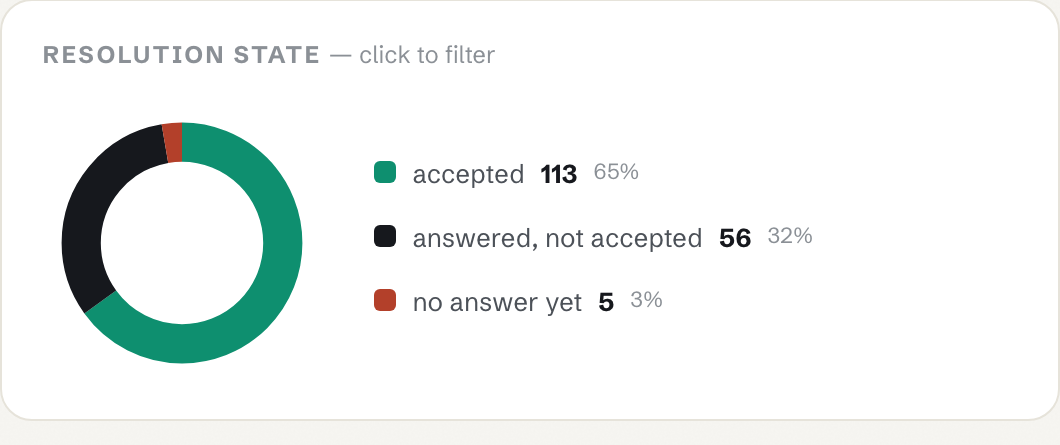
Resolution state donut — 65% accepted, 32% answered, 3% awaiting
01 · Proof, not promises

Every number below is live.

Fetched from the production system on this page load — not a case study, not a projection.

Saved to date

vs. answering everything manually

Answer satisfaction

from real client users, thumbs on every answer

Handled

support tickets + AI-answered questions

Running cost — per month
SaaS help desk
CC-RAGOS, all in

same team, entire platform vs seat fees alone

Seat fees

SaaS fees avoided — agent seats at $0/agent, forever

live figures load on every visit full executive brief →
02 · One platform, four surfaces

Watch each piece do its job.

Screen recordings of the deployed products — real data, real answers. Click to play, fullscreen for detail.

Deflection

Help Center

  • Live-synced articles, search and categories
  • Ask-AI answers with citations before a ticket is filed
  • Duplicate-ticket detection built in
open live ↗
Grounded answers

Docs Assistant

  • Streaming answers, cited only from official docs
  • Ask by voice or paste an error screenshot — vision answers grounded in the docs
  • Every answer rated 👍/👎; admins ✔-verify the best ones, which feed back into retrieval as “Team-verified”
  • Doc gaps auto-logged → one click drafts the missing docs page, ready to paste
  • Pinned threads, projects, search, .md export, per-user token analytics
open Unify docs ↗   Simplified docs ↗
Multi-tenant

Second Client, Same Engine

  • Simplified Checkout portal — re-skinned, not rebuilt
  • Own knowledge base, docs assistant, branding, users
  • Proof the platform generalises
help center ↗   docs assistant ↗
70 seconds

The Whole Story

  • Support desk: charts, SLA aging, agent scorecards
  • AI draft replies, ticket → documentation promotion
  • Weekly digest for management
open the desk ↗
03 · From raw document to cited answer

One pipeline, fully owned.

No Dify, no black-box vendor. A FastAPI orchestration layer runs retrieval and ingestion; Next.js presents the evidence; Qdrant holds the vectors.

1 · Ingest

Parse anything

Docling handles scanned PDFs, complex tables and figures other pipelines choke on.

2 · Chunk

Structure-aware

Agentic chunking with contextual retrieval — chunks keep their document meaning.

3 · Embed

Vectors, owned

Embeddings land in Qdrant Cloud — one source of truth, hybrid dense + sparse search.

4 · Retrieve

Evidence first

Multi-hop agentic retrieval filters, re-ranks and keeps only what supports an answer.

5 · Answer

With receipts

Streaming responses cite the exact chunks used — provenance in the UI, not a black box.

6 · Measure

Close the loop

Feedback, doc-gap logging and a weekly digest turn every miss into new documentation.

04 · Reports on demand

Ask the platform anything — from Claude.

A built-in MCP server exposes the live support and docs data as read-only report tools. Point any MCP client at it — Claude, Cursor, whatever your team uses — and compose custom reports in plain English. No BI tool, no exports, no waiting on an analyst.

How did support perform last month, and what did it save us?
composed live from tickets, chats, satisfaction and cost data
Which documentation gaps came up most this week?
clustered from real unanswered questions, with suggested article titles
Draft the Monday report for management.
weekly digest built from the same numbers this page shows
Compare last month across both client portals.
one connection, both portals — each token opens only its own door

One endpoint, your whole support brain.

Remote MCP server (Streamable HTTP), token-gated, read-only. The same data behind the desk dashboard and this page — queryable by any agent you trust.

  • Tickets, conversations, satisfaction & feedback tools
  • Doc-gap and weekly-digest reports
  • Both client portals through one connection — pass each portal's token, every question routes to the right one
  • Per-portal admin gating — each client's admin sees only their own data
MCP ENDPOINThttps://web-self-theta-77.vercel.app/api/mcp/mcp
05 · Build vs. buy

Why not just buy a help desk?

Because seat fees scale with your team, and their AI can't cite your docs the way your own pipeline can. This category is real money — Salesforce paid $3.6B for Intercom's Fin AI agent in June 2026. We run the same capability in-house for about $240 a year.

Head to head

Zendesk / IntercomApache AnswerCC-RAGOS
Cost per agent$55–115 / mofree$0
Cited AI answers$0.99 / resolution (Fin)noneincluded
Your infra, your datatheir cloudself-hostedself-hosted
Multimodal ingestionPDF · tables · images
Doc-gap detectionautomatic
Running cost$5,280+/yr (8 seats)hosting only~$240/yr total

Your numbers

$—estimated saved per year — team hours freed plus seat fees avoided
06 · Questions, answered

The short version.

What exactly is CC-RAGOS?

A self-hosted, explainable multimodal RAG platform: one FastAPI + Next.js + Qdrant engine powering grounded doc-chat, embeddable help centers and a full support desk — deployed today for two client portals.

Is this a demo or a real product?

Real. Two client support portals run on it in production, and the numbers on this page are fetched live from the running system. AI support is a $2B+ market growing fast — this is the self-hosted end of it, running for real users today.

What does it cost to run?

Free-tier cloud (Vercel + Qdrant + KV) plus roughly $20/month of LLM API usage. No per-agent seat fees at any team size.

How are answers kept honest?

Every response cites the exact source chunks it was grounded on, users rate every answer, and unanswerable questions are logged as documentation gaps with suggested titles.

Can it handle our messy PDFs?

That's the point. Docling-powered ingestion parses scanned PDFs, complex tables and embedded figures — the documents most pipelines skip.

What about our existing Q&A portal?

One-click sync pulls an entire Answer-style Q&A board into the corpus, and the help center stays live-synced to it afterwards.

Own your support stack.
Keep the receipts.

See the live system, the numbers behind it, and what it would save your team.

Watch it work