Self-hosted · Explainable · Multimodal RAG

Every answer,
with receipts.[1][1] Every response cites the exact source chunks it was grounded on — provenance is visible in the UI, not hidden in a black box.

CC-RAGOS turns your real documentation — PDFs, tables, images, help articles — into grounded, cited AI support[2][2] Docling-powered ingestion parses documents other pipelines choke on: scanned PDFs, complex tables, embedded figures. that lives on your own infrastructure and answers where your users already are.
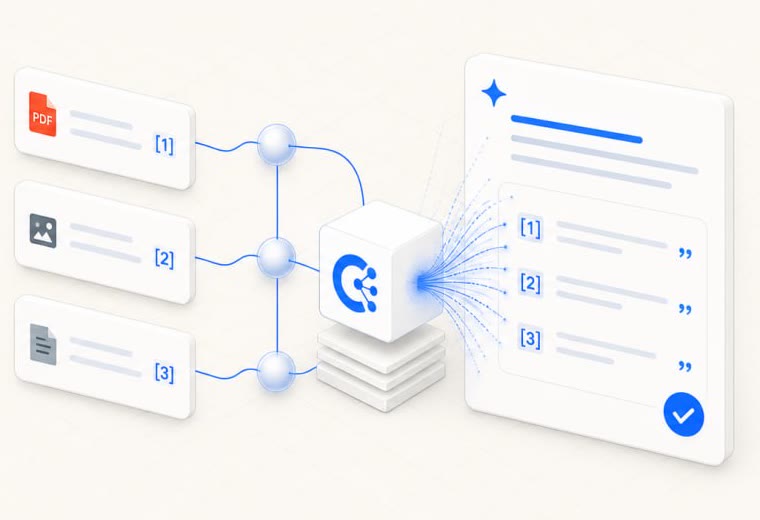
Documents flowing through the RAG engine into a cited answer — every source numbered and traceable
Live — from real usage
$—saved to date
tickets + AI answers handled
answer satisfaction
4deployed units — app + three client portals
100%answers grounded & cited
0per-seat SaaS fees
24/7ticket deflection, before the queue
Why teams pick it

Built for resolution, not just replies.

Launch fast with your knowledge

Docling ingests the docs you already have — PDFs, tables, images, help articles — straight into a searchable, cited corpus.

Resolve end to end

Chat answers with receipts, duplicate-ticket detection, ticket creation, AI-drafted replies — the whole loop, not just a chatbot.

Govern & measure

LLM-as-judge evals, satisfaction tracking, agent scorecards, weekly digests — every claim on this page is measured, not asserted.

Improve with every gap

Questions the docs can't answer become a clustered, prioritized writing backlog — the system gets smarter as it fails.

01 — Return on investment

Where the hours and the budget come back.

Not projections — the numbers below are computed live from real platform usage every time this page loads.

Live — measured from actual usage
Docs chat — AI answers from documentation
questions answered by AI
conversations
support hours saved
est. cost saved
answer satisfaction
Support desk — Unify + Simplified, replacing Intercom/Zendesk
tickets managed
responded by team
resolved
agent seats, no SaaS fees
saas fees avoided
Cost of support — with vs without CC-RAGOS
without platform (SaaS seats + manual answers) with CC-RAGOS savings
saved to date
current savings / month
projected next 12 months
Monthly activity — last 12 months
desk ticketsdocs-chat conversations
Lever 01

Ticket deflection

The Ask-AI widget and docs-chat answer routine questions before they ever reach the queue — support hours saved around the clock.

Lever 02

Faster agent replies

Similar-tickets lookup, AI drafts, and tone refinement inside the Support Desk cut per-ticket handle time.

Lever 03

Docs-gap detection

Failed questions become a prioritized docs backlog — fixing the root cause of tickets, not just the symptom.

Lever 04

Automated reporting

The weekly report and the MCP server answer management's questions from live data — no manual assembly.

Lever 05

No per-seat fees

Self-hosted or free-tier cloud (Vercel + Qdrant Cloud + KV) — instead of Intercom/Zendesk-style per-agent pricing.

Proof

Track it, don't claim it

Deflected conversations per week, handle time before/after, docs written from the gaps panel — all surfaced by the platform itself.

02 — Your numbers

What would it save your team?

Drag the sliders — prefilled with this platform's real live figures. Estimates, clearly labeled as such.

$—estimated annual savings
team hours freed / year
SaaS seat fees avoided / year

savings = deflected ticket hours × hourly cost + seats × $39/mo, minus ~$240/yr platform cost. Illustrative only — the section above is the measured reality.

05 — How it works

From raw document to cited answer.

One pipeline, fully owned: no Dify, no black-box vendor. A lightweight FastAPI orchestration layer runs retrieval and ingestion; Next.js renders the evidence.

STEP 1

Ingest

Docling parses PDFs, tables, images & web docs — formats other pipelines drop.

STEP 2

Chunk

Agentic chunking splits by meaning, not by character count.

STEP 3

Embed

Vectors land in Qdrant — one cloud source of truth, hybrid-searchable.

STEP 4

Retrieve

Hybrid search + metadata filters + rerank pull the right evidence.

STEP 5

Answer

Agentic RAG chat composes the reply — every claim pinned to a chunk.

STEP 6

Measure

LLM-as-judge evals score faithfulness on real conversations.

03 — See the product

One platform, four working surfaces.

Click through — every screen below is the live system with real data, not a mockup.

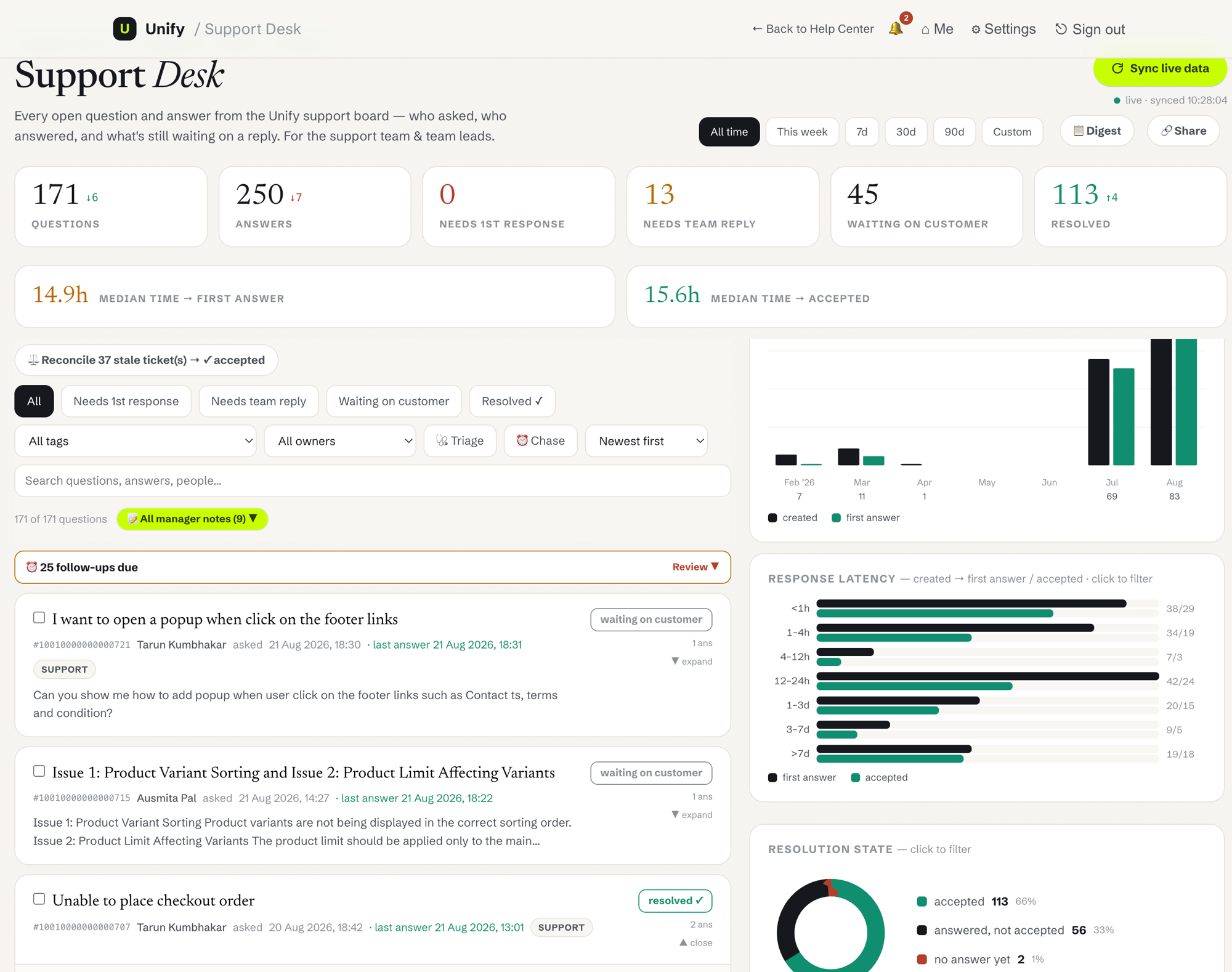
Unify Support Desk with live ticket states and analytics

The team's command center

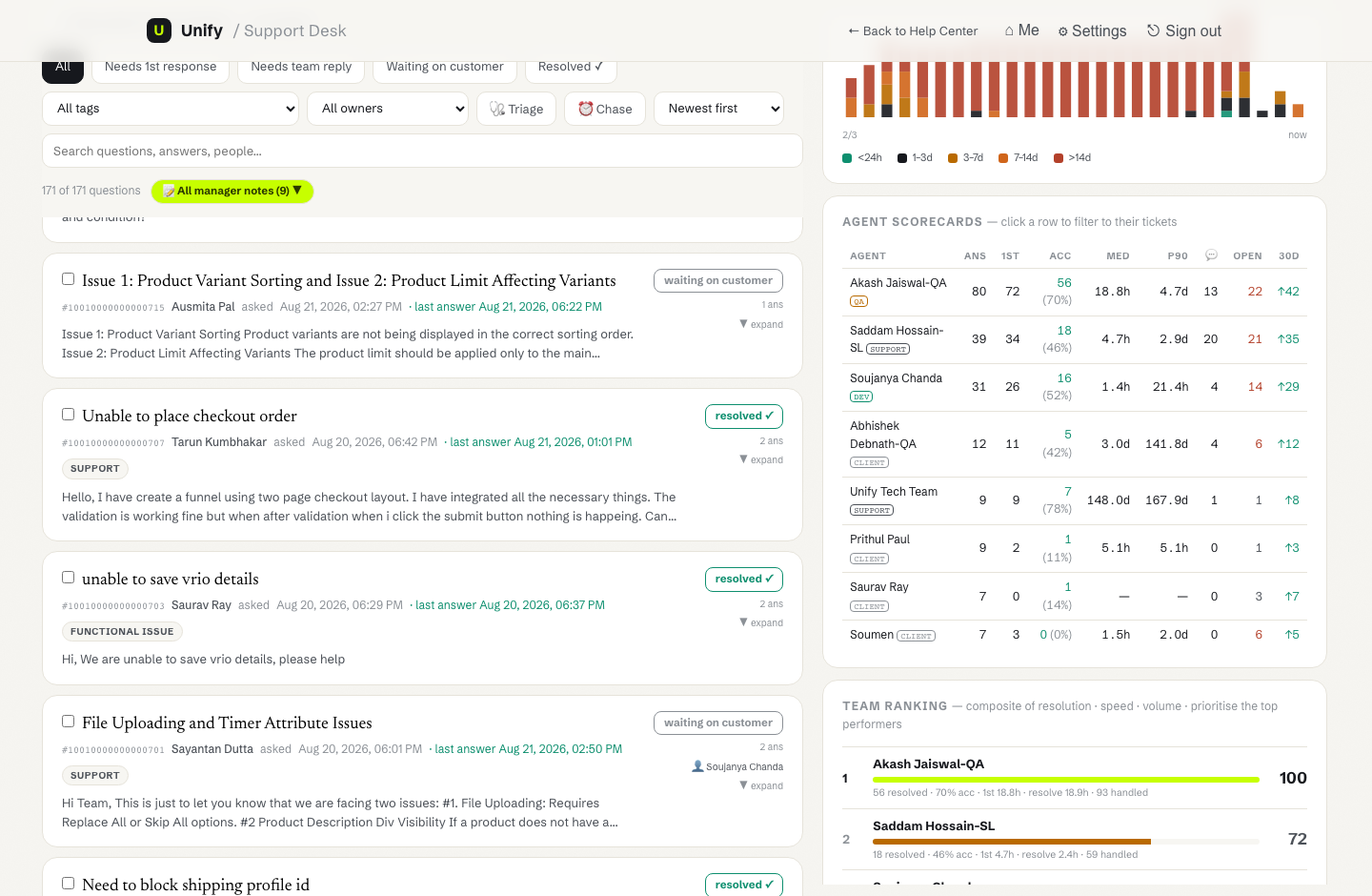
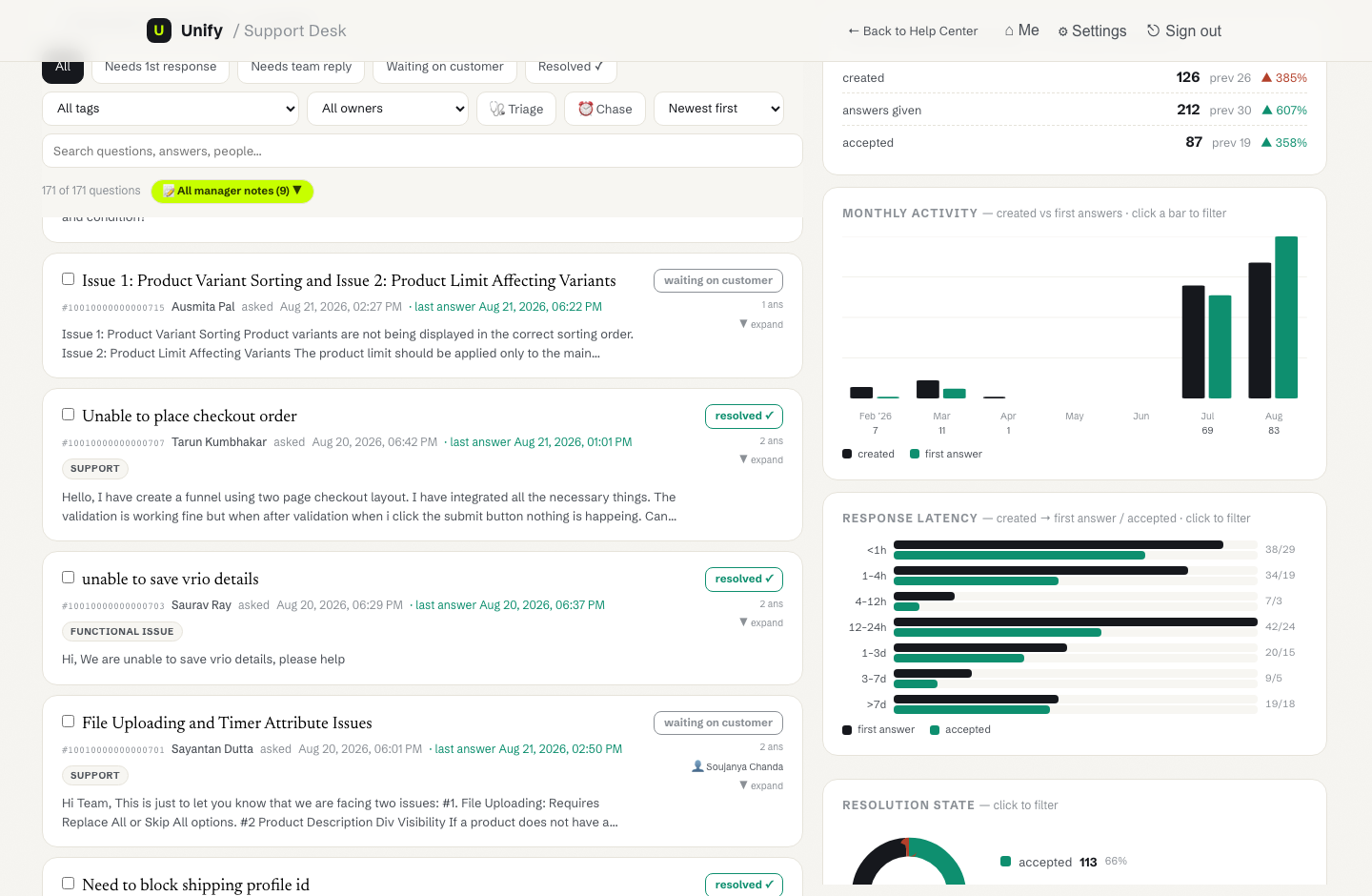
  • 16 clickable charts: latency, SLA aging, backlog, heatmap, tag trends
  • Agent scorecards — acceptance rate, median/p90, live workload
  • Triage & Chase presets, follow-up reminders, stale-ticket reconcile
  • AI draft replies + tone refine, promote ticket → documentation
  • Digest, CSV export, shareable frozen views for management
open the live desk ↗
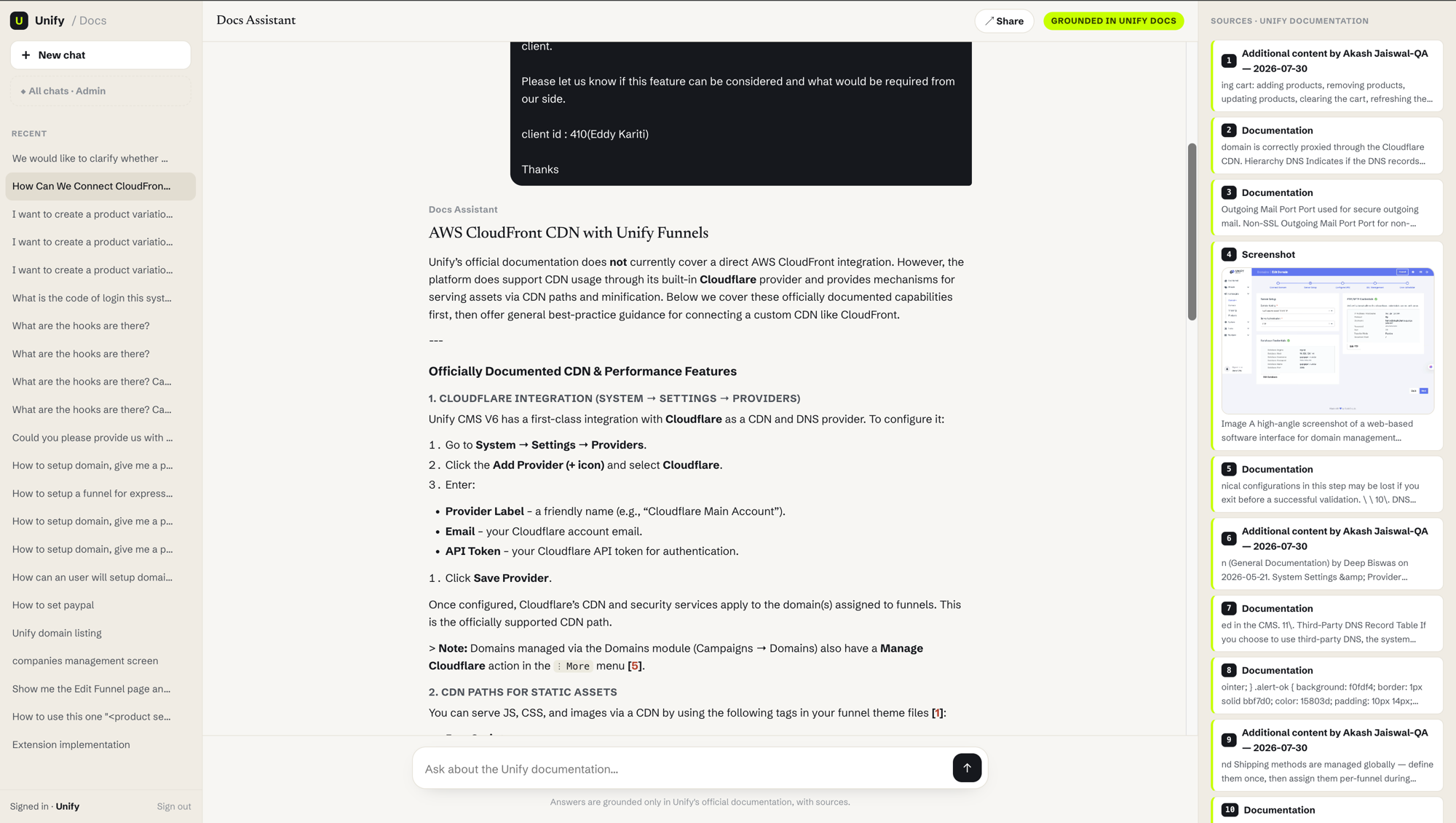
Docs Assistant answering with numbered citations

Answers with receipts

  • Streaming answers grounded only in official docs
  • Numbered citations — text and screenshots, lightbox zoom
  • Suggested follow-ups, 👍/👎 feedback, shareable snapshots
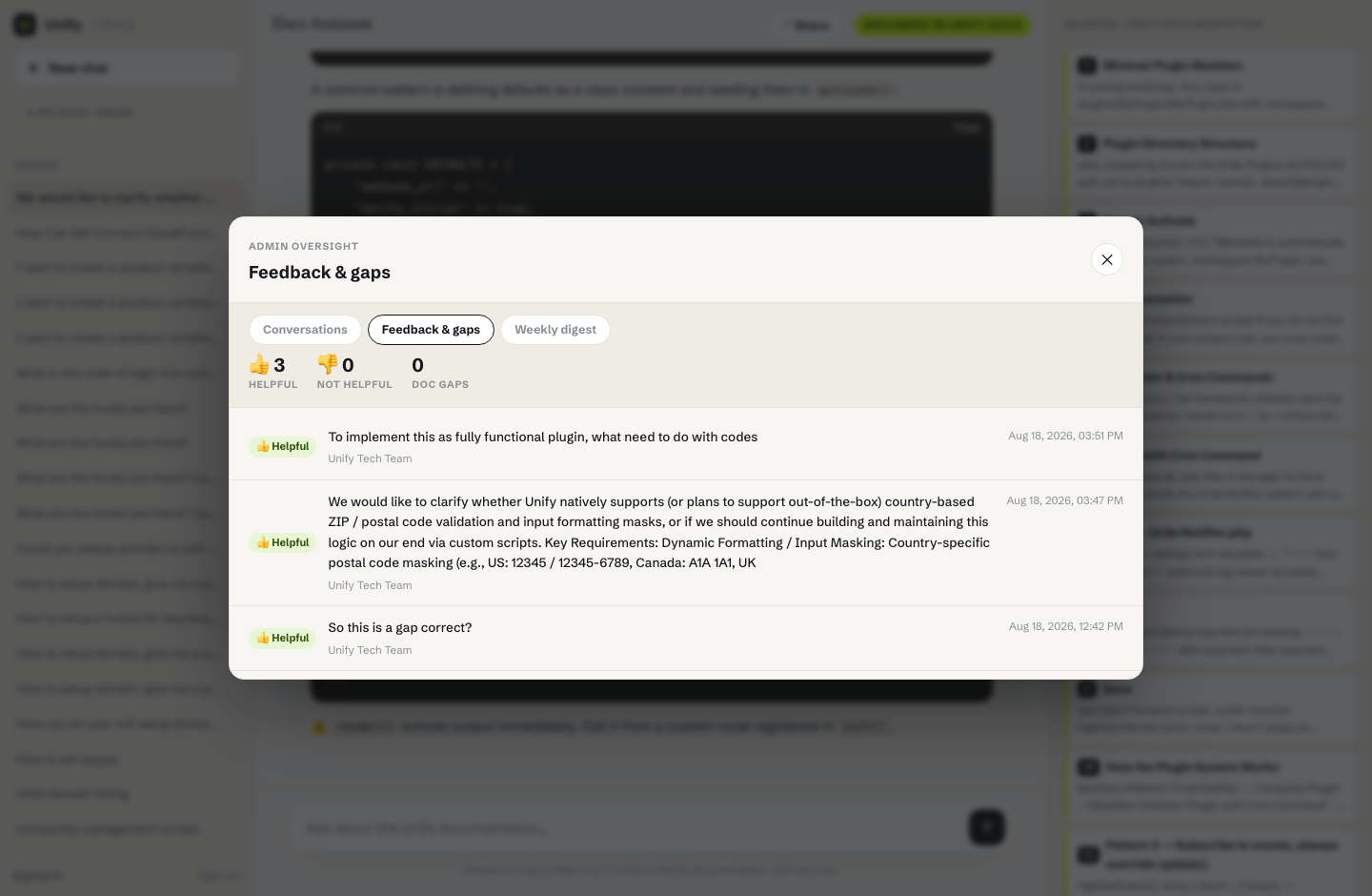
  • Admin sees every chat + clustered doc-gaps with suggested titles
  • Weekly digest: top questions, satisfaction, actions
open docs chat ↗
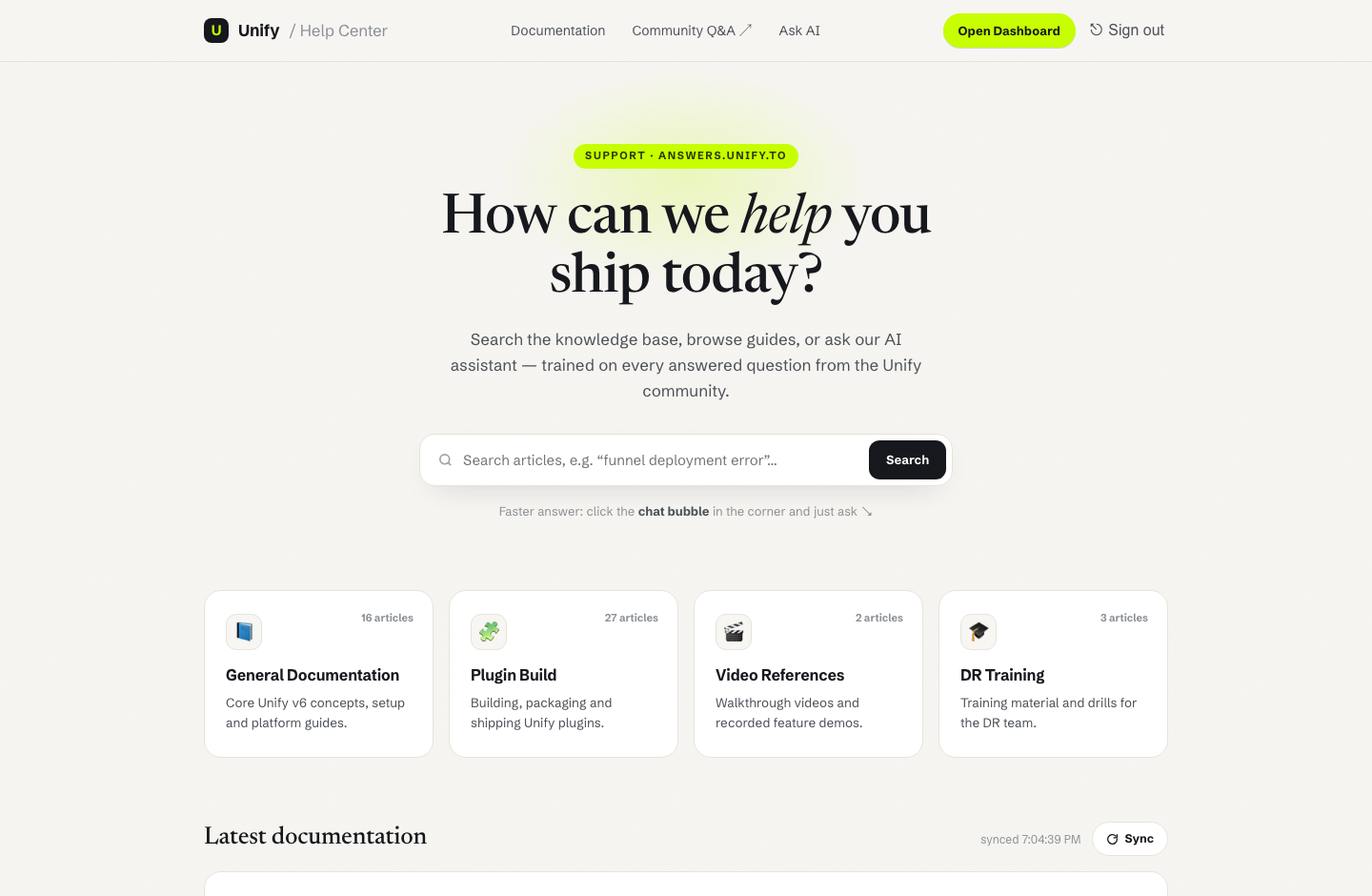
Unify help center with live search and Ask AI

Deflection where users already are

  • Live-synced help center: search, categories, latest docs
  • Ask-AI bubble with citations · agentic multi-hop mode
  • Duplicate-ticket detection before a ticket is filed
  • Create-ticket-from-chat with live portal tags
  • Agent-assist AI-draft button inside the Answer portal itself
open help center ↗
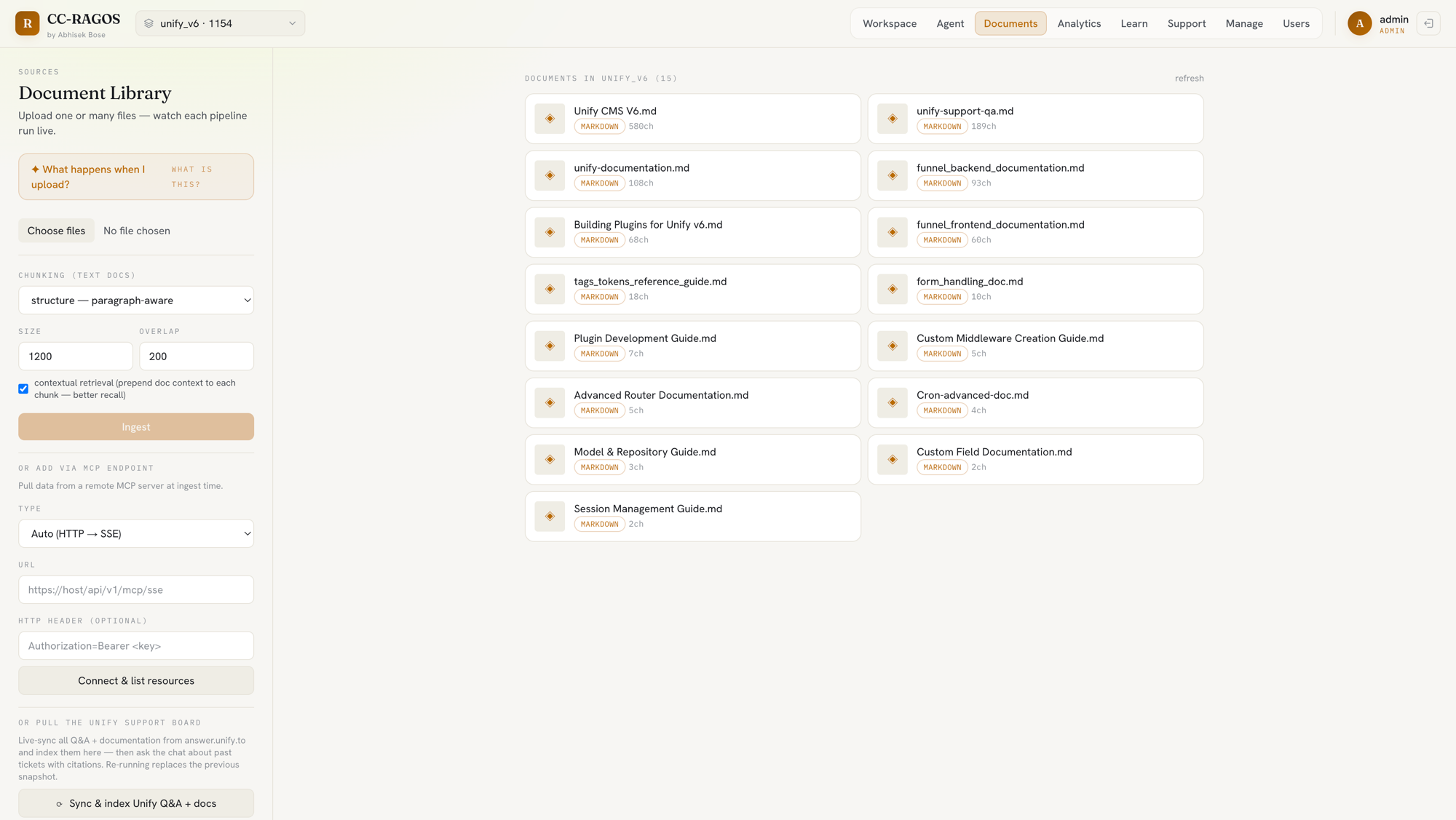
Document library and ingestion pipeline

Where knowledge enters

  • Upload files or pull from remote MCP endpoints
  • Structure-aware / agentic chunking with contextual retrieval
  • One-click sync of the whole Answer Q&A board into the corpus
  • Watch each pipeline run live, per document
  • Vectors land in Qdrant Cloud — one source of truth
open the app ↗
Watch it work

Recorded live, end to end.

Full walkthroughs of the deployed surfaces — real data, real answers, no editing. Fullscreen for detail.

unify-support.vercel.app

Unify Help Center + Desk

1:45

Live search, category filters, portal sync, a grounded Ask-AI answer, then the full support-desk dashboard.

simplified-support.vercel.app

Simplified Checkout Support

1:28

The same platform re-skinned for a second client — search, filters, Ask AI and the team dashboard.

unify-docs-delta.vercel.app

Docs Assistant + Admin

1:29

A streamed, cited answer with code and screenshots, then the admin view: every chat, feedback & gaps, weekly digest.

04 — How it resolves

The loop, feature by feature.

Grounding

Every claim pinned to a chunk

Hybrid retrieval over your real docs; the answer cites the exact passages it used. Users can check the receipts — trust is inspectable, not assumed.

Cited answer with numbered sources
Agent assist

Drafts in the agent's voice

Grounded reply drafts, tone chips, similar-past-tickets — the human stays in charge, the AI does the typing. Handle time drops without losing judgment.

Agent scorecards and team ranking
Analytics

The ops picture, always current

Latency histograms, SLA aging, backlog-by-age, staffing heatmaps — every chart clickable to filter the queue. Managers stop asking for reports; the desk is the report.

Latency histogram and resolution charts
The gap loop

Failure becomes a to-do list

Every question the docs couldn't answer is logged, clustered by theme, and turned into suggested article titles. The knowledge base grows exactly where users need it.

Feedback and doc gaps admin panel
tickets responded by team
answer satisfaction
saved to date
tickets + AI answers handled
06 — Positioning

Not a competitor to Apache Answer.
The brain on top of it.

Our portals reuse Answer's login and Q&A data as the foundation — then add everything its built-in AI can't do.[3][3] Apache Answer's AI assistant (recent releases) only searches content already posted inside Answer — it has no document-ingestion pipeline.

Capability Apache Answer CC-RAGOS
Knowledge source Only Q&A posted inside Answer Any document — PDFs, tables, images, web docs + the Q&A
Answer grounding Black-box AI assistant Chunk-level citations, visible provenance
Quality measurement No way to measure or tune LLM-as-judge eval harness on real conversations
Where users get help Destination site they must visit Embeddable widget + white-label portals on the client's own site
Support-ops insight Votes & reputation Content-gap detection, feedback panel, weekly digest to management
Custom reporting MCP over its own Q&A MCP server over cross-portal support + docs-chat intelligence
Pipeline control Fixed, take-it-or-leave-it AI Own retriever, chunking, model routing — tunable per client

In one line: Answer stores the knowledge people already asked about. CC-RAGOS turns all client knowledge into cited, measurable, embeddable AI support — and reports back what knowledge is still missing.

07 — Questions, answered

FAQ.

What exactly is CC-RAGOS?

A self-hosted, explainable multimodal RAG platform: one FastAPI + Next.js + Qdrant engine powering grounded doc-chat, embeddable help centers, and a full support desk — deployed today for two client portals.

How are answers kept honest?

Every answer cites the exact source chunks it was grounded on, and an LLM-as-judge eval harness scores faithfulness on real conversations. If it can't cite it, it says so — and logs the gap.

Does it replace Apache Answer?

No — it sits on top. Answer stays the Q&A system of record and login provider; CC-RAGOS adds document ingestion, cited AI answers, deflection widgets, analytics and reporting that Answer doesn't have.

Where does the data live?

On infrastructure we control: vectors in Qdrant Cloud, app data in Vercel KV, heavy ingestion on our own hardware. The public stats endpoint serves counts only — no user content ever leaves the platform.

What does it cost to run?

Free-tier cloud (Vercel + Qdrant + KV) plus roughly $20/month of LLM API usage. No per-agent seat fees — that alone avoids ~$374/month versus a Zendesk-style desk at current team size.

Which models does it use?

Model-agnostic via OpenRouter — models are swapped server-side without redeploying, and different tasks (answering, drafting, judging, clustering) can use different models.

How do the ROI numbers on this page work?

They're computed live from platform data on every page load: real conversation and ticket counts, with a clearly-footnoted model for time and cost (15 min per AI answer, 30 min per manual ticket, $20/h, $39/seat — all configurable).

Can customers file tickets from the widget?

Yes — and before they do, the widget searches past tickets and docs for duplicates, shows matching threads inline, and only then offers "create ticket anyway," pre-tagged and pre-filled.

08 — The stack

Owned end-to-end.

Heavy ML stays local where the RAM is; serving runs on free-tier cloud. Ingest once locally, query from anywhere.

See it resolving real questions, right now.

Four live deployments, one engine. Open any of them — the data on this page came from there.